


UMB is transitioning its telephony services to Microsoft Teams. Teams Calling will take the place of both Webex Unified Calling and traditional desk phones. With Teams Calling, staff can make and receive calls directly from the Microsoft Teams app on their computer or smartphone.
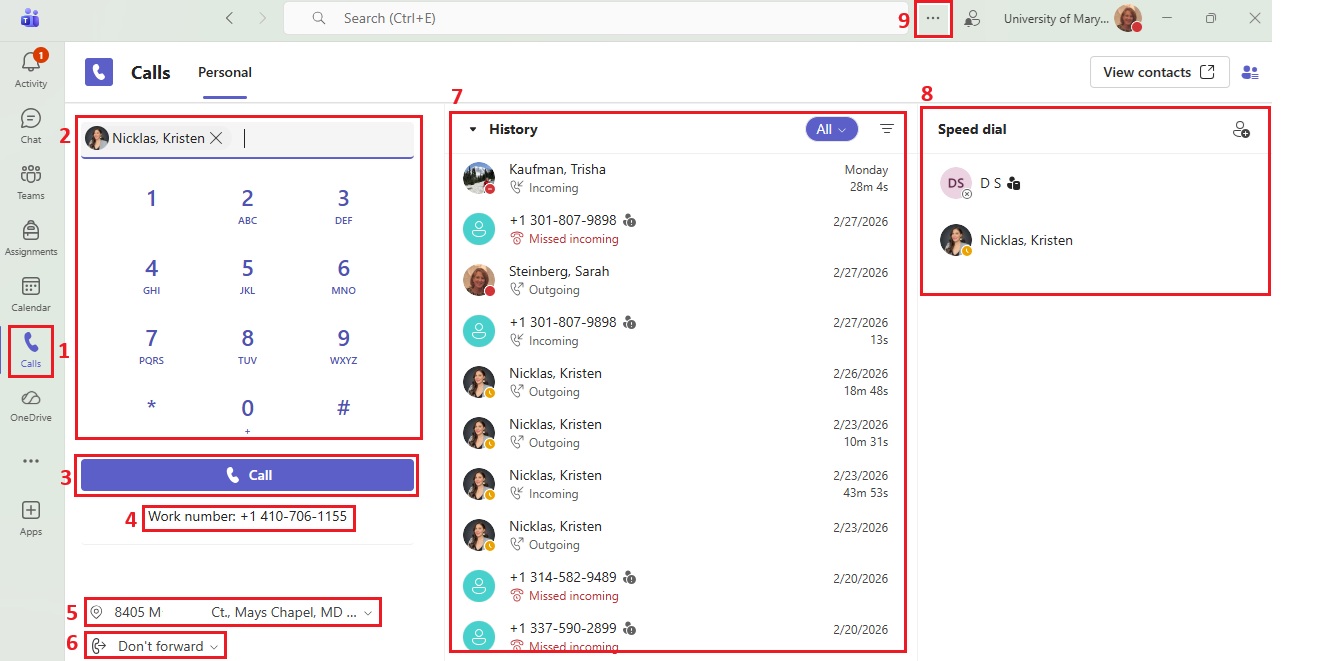
- Calls tab – the main area to place calls
- Dial pad – enter a phone number or enter a name if they are internal to UMB.
- 5-digit dialing is allowed to 6xxxx, 8xxxx and 41xxx/42xxx.
- Any call can be made by dialing a 10-digit number (area code + number).
- Call button – click to place a call once a name or number has been entered (the button will say Call as myself if you are set as someone’s delegate).
- Your work number – your UMB phone number.
- Emergency location –
- When on campus, the system will know your location and it cannot be changed.
- When remote, each user must add/update their location. See “Emergency Location” section for further information.
- Call forwarding – click the drop-down to set call forwarding settings.
- History – list of recent missed/incoming/outgoing calls and voicemail.
- Speed dial – list of users address to speed dial. Click the Person icon to the far right to add someone.
- Ellipses – select to view menu and select Settings to view all Teams settings.
Teams App on a Computer
- Method One
- Select the Calls icon on the left side of the Teams app.
- Enter a number manually using the number keypad.
- Select the Call icon
- Method Two
- Search for the person using the Search Barat the top of the Team app window.
- Select the person from the list presented.
- Select the Audio call icon in the upper right corner of the chat window to call them.
Teams App on a Smartphone
Download the Teams App from the App Store on your Smartphone and open the app.
- Method One
- Tap on the … More icon in the lower right corner of the app.
- Tap on the Calls icon
- Tap on the phone+ icon in the lower right corner.
- Enter the number you wish to call. Tap the telephone icon to place the call.
- Method Two
- Tap on the… More icon in the lower right corner of the app.
- Tap on the Calls icon
- Tap on the phone+ icon in the lower right corner.
- Select the People tab at the top of the screen.
- Search the UMB directory for the person you wish to call.
- Tap the phone icon to the right of their name to make an audio call or the video camera icon to make a video call.
From UMB Contacts
Through the desktop or web application
- If you receive a call from someone on campus, you will be notified through a pop-up window on your screen.
- Select the camera icon to answer with your video capabilities and the telephone icon to answer with audio capabilities only.
Through the mobile application
- The incoming call will use your device's default method of showing an incoming call with the contact's name and it will indicate that it is coming from Microsoft Teams.
- Select the video icon to answer with your video capabilities and the telephone icon to answer with audio capabilities only.
From External Contacts
Through the desktop or web application
- If you receive a call from an external contact, the phone number or ID of the caller will appear in a pop-up window on your screen.
- Select the telephone icon to answer the call.
Through the mobile application
- The incoming call will use your device's default method of showing an incoming call with the contact's phone number or ID.
- Select your phone's call answer button to pick up the call.
Recording an Outgoing greeting
- Go to Settings > Calls
- Scroll and locate Manage Voicemail
- Click Record a greeting and follow the prompts to record and outgoing message
Listening to a Voicemail
The voicemail can be listened from:
- An email notification will be sent with an audio file which can be listened to directly from the email.
- The History area of the Teams Calls tab. Along with listening to the voice mail, if you hover your mouse over the notification, the option to “Call” will appear.
If an emergency occurs, it is recommended to dial 911 from a cell phone or landline phone first. However, if MS Teams must be used to dial 911, your location listed in Teams will be used.
- When on campus, the system will know your location and it cannot be changed.
- When remote, you must add your location.
- Go to Settings > Calls
- Scroll to the bottom and location Emergency calling
- Click Verify
- Select Enter address manually
- Enter address
- Click Confirm
In the Teams app, click the ... (ellipses) icon and select Settings from the menu to view all settings for the Teams app. Locate and select Calls in order to access and view your settings for:
- Call handling and forwarding
- Manage Voicemail
- Manage out-of-office voicemail
- Manage call group
- Manage delegates
- Emergency calling