


FAQ's
Yes, the data steward (RIC) can assist with bringing data into the SRE.
If data other than EPIC data need to be used, a data steward need to be selected to be responsible for that data. Contact the SRE team at sre-support@umaryland.edu.
Disconnecting closes your session, but leaves an active connection to the host. You can disconnect and reconnect to the session later.
To Disconnect:
- Close Windows App session window or tab
- Or click Start > Power > Disconnect
- Session remains running
Signing Out removes your connection to the host. SRE IT may ask you to sign out entirely and back into the SRE desktop in order to gain access to additional resources.
To Sign Out:
- Start > Your Name > Sign Out
- Ends session
To maintain the SRE being free to use and to improve end-user experience, sessions will be automatically logged off after 3 hours of inactivity. If you have any questions or concerns, please email sre-support@umaryland.edu.
Visit this page to learn more : Costs Associated with SRE - Center for Information Technology Services
No, SRE documents are not stored within the OneDrive. and cannot be worked on at the same time.
To import data into the environment, contact RIC, or the designated data steward for your project. In most cases, the data will need to be transferred to your project's Teams channel. Once approval is granted, the data will be available in the project's ingress folder on the SRE desktop.
The Ingress folder is available to all team members and those added to the IRB protocol. Every member of the research entire team can work out of the ingress folder
To facilitate data egress from the SRE:
- Copy the required data into your project's designated egress folder on the SRE desktop.
- Note: It's best to zip multiple files.
- Contact the data steward (RIC) to request required file review and approval.
- Note: An automated egress pipeline operates daily (12am, 6am, 12pm, 6pm) and sends all files in the egress folder to a location where the Data Steward can review the file.
- Note: PHI/PII cannot leave the SRE.
- Access reviewed and approved egressed files in your project's Teams channel.
EPIC data is sourced from UMMS. Any data from that system needs to be brought into the environment by the RIC. In other words, EPIC itself does not live in the SRE and RIC is always the data steward.
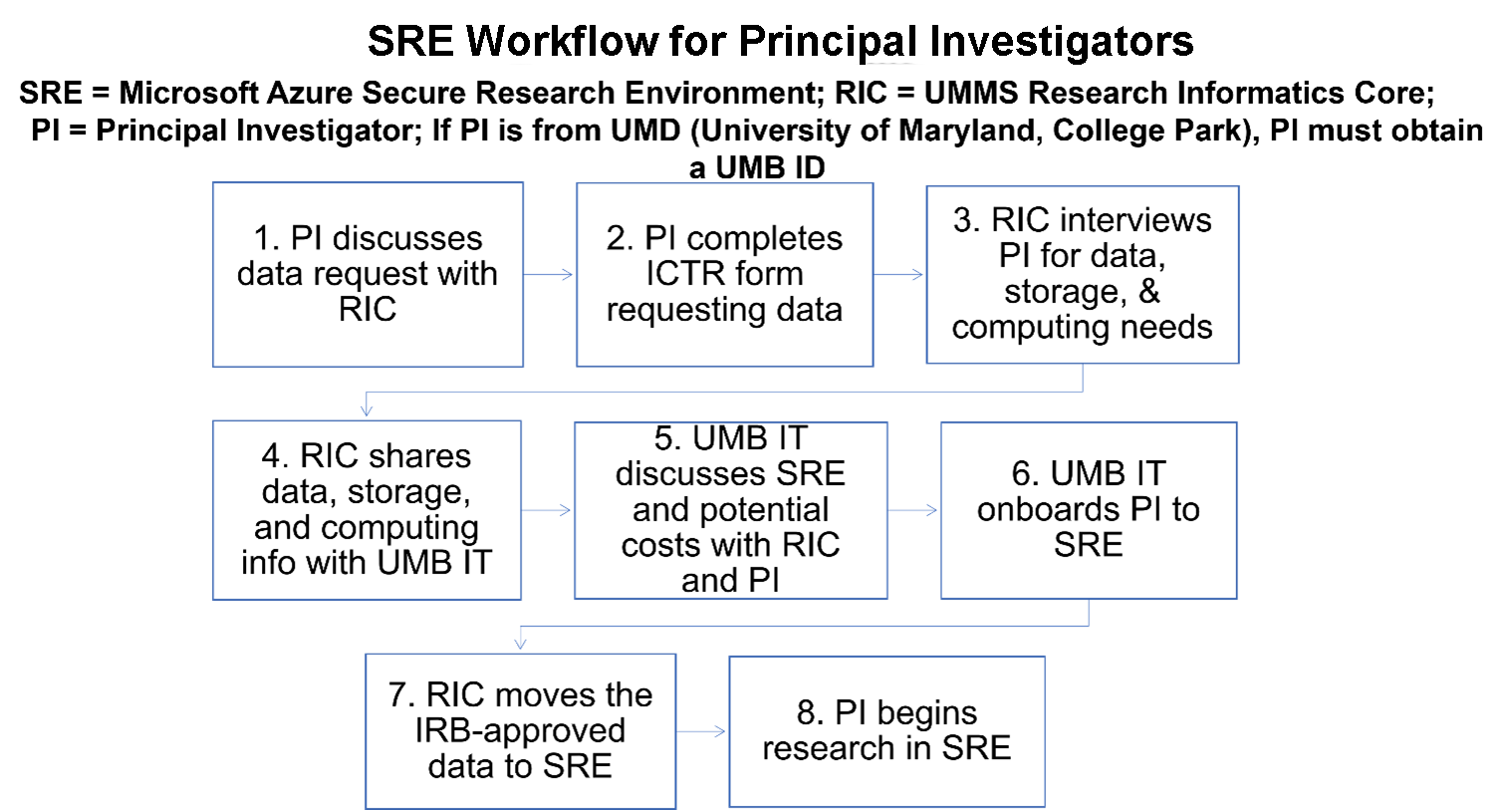
SRE Workflow for Principal Investigators
SRE = Microsoft Azure Secure Research Environment; RIC = UMMS Research Informatics Core;
PI = Principal Investigator; If PI is from UMD (University of Maryland, College Park), PI must obtain a UMB ID
- PI discusses data request with RIC
- PI completes ICTR form requesting data
- RIC interviews PI for data, storage, & computing needs
- RIC shares data, storage, and computing info with UMB IT
- UMB IT discusses SRE and potential costs with RIC and PI
- UMB IT onboards PI to SRE
- RIC moves the IRB-approved data to SRE
- PI begins research in SRE
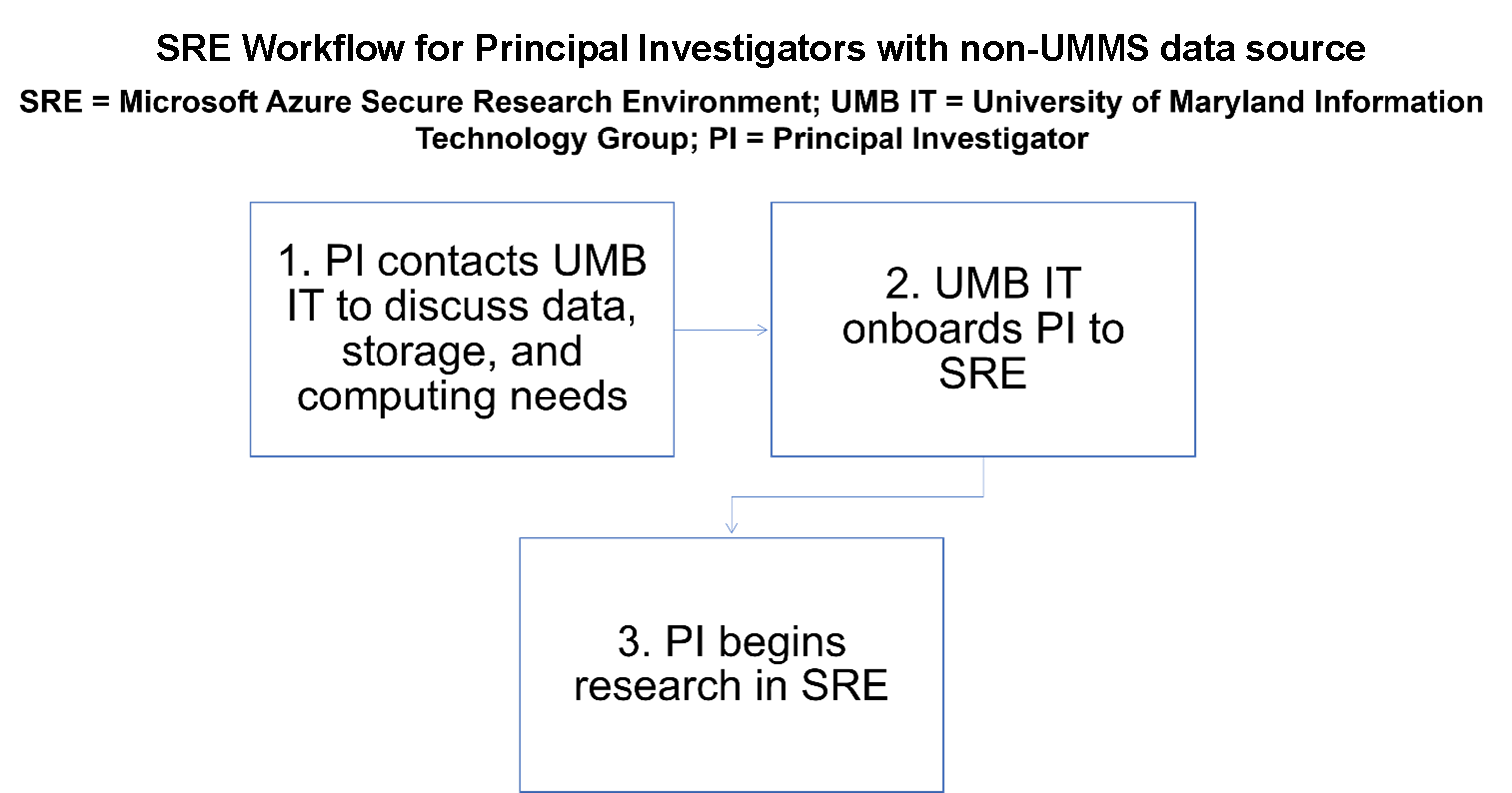
SRE Workflow for Principal Investigators with non-UMMS Data source
SRE = Microsoft Azure Secure Research Environment;
UMB IT = University of Maryland Information Technology Group;
PI = Principal Investigator
- PI contacts UMB IT to discuss data, storage, and computing needs
- UMB IT onboards PI to SRE
- PI begins research in SRE
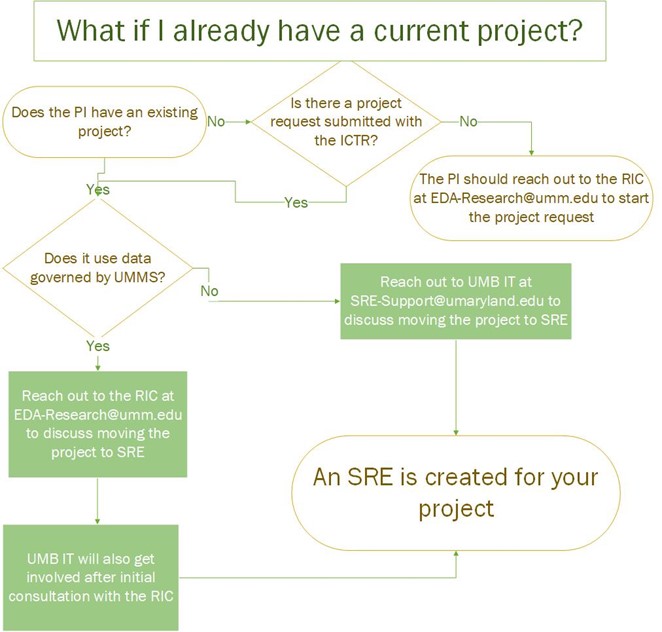
What if I already have a current project?
Does the PI have an existing project?
- No: Is there a project request submitted with ICTR?
- No: The PI should reach out to the RIC at EDA-Research@umm.edu to start the project request
- Yes: Does it use data governed by UMMS?
- Yes: Reach out to the RIC at EDA-Research@umm.edu to discuss moving the project to SRE.
- UMB IT will also get involved after initial consultation with the RIC.
- An SRE is created for your project
- UMB IT will also get involved after initial consultation with the RIC.
- No: Reach out to UMB IT at SRE-Support@umaryland.edu to discuss moving the project to SRE
- An SRE is created for your project
- Yes: Reach out to the RIC at EDA-Research@umm.edu to discuss moving the project to SRE.
- Yes: Does it use data governed by UMMS?
- Yes: Reach out to the RIC at EDA-Research@umm.edu to discuss moving the project to SRE.
- UMB IT will also get involved after initial consultation with the RIC.
- An SRE is created for your project
- UMB IT will also get involved after initial consultation with the RIC.
- No: Reach out to UMB IT at SRE-Support@umaryland.edu to discuss moving the project to SRE
- An SRE is created for your project
- Yes: Reach out to the RIC at EDA-Research@umm.edu to discuss moving the project to SRE.
Research needs are discussed with an IT engineer who will advise the PI as to the appropriate computer configuration and data storage needs required to support the project.
There is no set limit on the data storage capacity, but to be judicious and cost-effective, a PI with the help of an IT engineer will determine an appropriate amount of storage that would support the project.
The data should reside in the SRE during the course of the research project. After project completion, a cost-effective and secure approach to the data should be used, e.g., the data should be securely archived or deleted.
SRE Guidebook & Glossary:
For definitions to SRE related abbreviations or to learn more about how PHI & PII are defined, download and print the SRE Glossary or view the glossary from the drop-down menu below.
Appendices:
Azure, Microsoft’s cloud platform, is an evolving collection of integrated Cloud Services spanning compute, data storage, and software applications.
Reduced operational overhead. No need to:
- Dedicate physical space for computing equipment.
- Monitor hardware health, manage firmware, and repair failed hardware.
- Perform complex hardware replacements.
- Size, purchase, house, & maintain:
- Server and data storage equipment
- Datacenter networking equipment
- Complex datacenter network connectivity
- Uninterruptible power supply (UPS) equipment and power feeds
- Large, expensive HVAC equipment
Capacity
- Azure has massive compute capacity, virtually unlimited computing resources that can scale as needs grow. We have the ability to quickly provision resources, such as servers, in extremely large quantities, use those resources for as long as necessary and immediately de-provision them when they are no longer required. This model eliminates the need for over-provisioning resources to meet unknown future demands.
Agility
- Virtual servers can be provisioned and deployed quickly, rather than taking weeks or months needed to procure and configure on-campus equipment.
Redundancy
- Microsoft has 69 Azure geographic regions, which offers system redundancy across regions.
- Traditional on-premises redundancy requires doubling hardware which must be maintained for just-in-case situations and sits mostly idle. Microsoft’s hardware infrastructure is fully redundant with the cost spread across all Azure customers to minimize the cost of infrastructure redundancy to UMB. This alleviates concerns related to the availability and disaster recovery of on-campus data centers.
Availability
- The Microsoft agreement with University of Maryland, Baltimore (UMB) assures high availability, with an almost 100% Azure uptime/availability.
Sustainability
- Shift UMB power consumption for computing to renewable energy sources.
- Microsoft is dedicated to their increased use of green and renewable energy sources to power their datacenters. Microsoft has a commitment to sustainability, making a $1 billion investment in a climate fund; UMB computing power consumption and carbon footprint will be reduced by using Microsoft Azure
Security
- IT security and data protection is enhanced by leveraging Microsoft’s personnel and sophisticated security tools. Microsoft has over 3,500 security experts who continually monitor sensitive data stored in Azure. Microsoft invests over $1 billion annually in IT security.
Cost
- The pay-as-you-go model for the cloud infrastructure only requires paying for those services (compute and storage) that are used and consumed over a particular period of time. There is a reduced cost to run Windows computers in Azure due to the Master agreement that UMB has with Microsoft; and we achieve cost savings with the pay-as-you-use subscription model.
Partnerships
- Microsoft also has an Innovation/Research focus, having established partnerships with the National Science Foundation and National Institutes of Health to provide computing resources to research organizations, e.g., STRIDES program (Science and Technology Research Infrastructure for Discovery, Experimentation & Sustainability).
AVD is a Microsoft Azure-based system used for accessing the Azure Cloud infrastructure. With an Internet connection, it provides access to applications and data in Azure. The hardware used for access does not need strong computing capabilities since that work is handled on the virtual end in Azure.
- The Azure Virtual Desktop (AVD) infrastructure is an important element in enhancing the security of data. AVD provides secure access to data stored in highly secured computing environments.
- AVD provides direct access, after logging in, to the software that you need and to your file/data storage.
- The presentation of AVD is very similar to logging in remotely to your desktop.
- AVD accounts can be quickly created.
- The computing resources within an AVD account can quickly scale to meet the computing needs of the user.
- There is a reduction in physical server hardware and hardware maintenance costs.
- There is no longer a need to buy and use costly, high-end computers.
- AVD supports multiple computing endpoints: Windows, Apple, Chromebook, and Android.
- There is a persistent user experience, where an individual can get access to applications and data at any time and from anywhere.
The University of Maryland, Baltimore (UMB) Secure Research Environment (SRE) is a centralized virtual environment designed to protect sensitive and restricted research data. Secure virtual desktop environments and custom compute allow researchers to access sensitive data under a higher level of control and data protection. Data is segregated per research project and only accessible by the research team that is assigned to the enclave.
Azure Defender for Cloud helps keep your data and applications safe when you're using Microsoft's Azure cloud services. It scans for any suspicious activity or potential problems and takes action to prevent or address them, making your cloud environment more secure. It will be enabled for all subscriptions as part of the deployment automation.
- User authentication is configured to the existing UMB Azure active directory tenant and active directory service.
- Private network access is isolated from existing UMB networks.
- All access to the secure enclave resources will be via endpoints in AVD.
- Monitoring, logging and reporting will be via Azure Log Analytics Workspace in the SRE Environment.
- Approved data is brought in and out of project-specific secured enclaves via an Honest Broker/Data Steward.
- Access to the public internet is blocked from within the SRE environment.
- A NIST 800-171 compliance policy will be applied as a default to research subscriptions; research/funding source requirements may require NIST 800-53 to be applied in certain instances.
- All Platform as a Service (PaaS) services will be deployed with private endpoints and public access disabled except where required.
- Azure Cloud Security Posture Management is enabled.
- Defender for Cloud Workload Protection enabled where required.
Safeguarding health-related information and other sensitive personal data, including Social Security numbers is a critical priority to UMB. The Secure Research Environment (SRE) has been established to ensure the protection of both this data and intellectual property generated from research studies. Utilization of the SRE is mandatory for any research that involves sensitive data, such as data supplied by the University of Maryland Medical System (UMMS). The SRE adheres to HIPAA regulations and relevant IT security policies to secure Protected Health Information (PHI) and Personally Identifiable Information (PII).
We are pleased to announce that our Secure Research Environment (SRE), built in Microsoft Azure, has received formal approval for its System Security Plan (SSP) for use by the Department of Defense (DoD). This approval confirms that our environment meets the requirements of NIST 800-171, ensuring robust protection of Controlled Unclassified Information (CUI) in accordance with federal standards.
In parallel, we are actively preparing a submission for an NIST 800-53 compliant environment to further extend our capabilities and compliance coverage. This next phase will support broader research initiatives and enhance our alignment with federal cybersecurity frameworks.
We appreciate the continued collaboration across teams and will share updates as the 800-53 submission progresses. For questions or further details, please contact the SRE support team.
Contact
Help Desk
601 W. Lombard St.
Suite 540
Baltimore, MD 21201
