


The Zoom service includes a virtual background feature that allows users to display an image as the background during teleconferences. The instructions are provided below.
- Download UMB approved backgrounds to your PC by visiting the Branding - Zoom Backgrounds page.
- Start or Join a Zoom Meeting
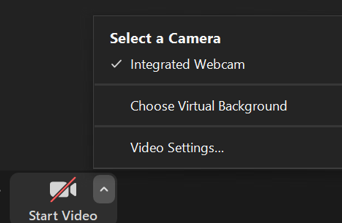
- Next to the Video button, click on the up arrow

- From the menu, select Choose Virtual Background
- Click on the plus sign (+), to upload your new virtual background to the Zoom Application

- Add Image and navigate to the file location, where your virtual UMB approved backgrounds are located
- Select your background. Congratulations! You’ve successfully added and changed your Zoom virtual background.