


Yes, the data steward (RIC) can assist with bringing data into the SRE.
You are able to copy and paste text from your local computer into the SRE. For example, you can copy cells from an Excel workbook outside of the SRE and into cells in an Excel document within the SRE. Please note that you can only copy and paste text; the feature does not work for images, rich text formats or files. Additionally, you cannot copy and paste out of the SRE.
If data other than EPIC data need to be used, a data steward need to be selected to be responsible for that data. Contact the SRE team at sre-support@umaryland.edu.
Disconnecting closes your session, but leaves an active connection to the host. You can disconnect and reconnect to the session later.
To Disconnect:
- Close Windows App session window or tab
- Or click Start > Power > Disconnect
- Session remains running
Signing Out removes your connection to the host. SRE IT may ask you to sign out entirely and back into the SRE desktop in order to gain access to additional resources.
To Sign Out:
- Start > Your Name > Sign Out
- Ends session
To maintain the SRE being free to use and to improve end-user experience, sessions will be automatically logged off after 3 hours of inactivity. If you have any questions or concerns, please email sre-support@umaryland.edu.
Visit this page to learn more : Costs Associated with SRE - Center for Information Technology Services
No, SRE documents are not stored within the OneDrive. and cannot be worked on at the same time.
To import data into the environment, contact RIC, or the designated data steward for your project. In most cases, the data will need to be transferred to your project's Teams channel. Once approval is granted, the data will be available in the project's ingress folder on the SRE desktop.
The Ingress folder is available to all team members and those added to the IRB protocol. Every member of the research entire team can work out of the ingress folder
To facilitate data egress from the SRE:
- Copy the required data into your project's designated egress folder on the SRE desktop.
- Note: It's best to zip multiple files.
- Contact the data steward (RIC) to request required file review and approval.
- Note: An automated egress pipeline operates daily (12am, 6am, 12pm, 6pm) and sends all files in the egress folder to a location where the Data Steward can review the file.
- Note: PHI/PII cannot leave the SRE.
- Access reviewed and approved egressed files in your project's Teams channel.
EPIC data is sourced from UMMS. Any data from that system needs to be brought into the environment by the RIC. In other words, EPIC itself does not live in the SRE and RIC is always the data steward.
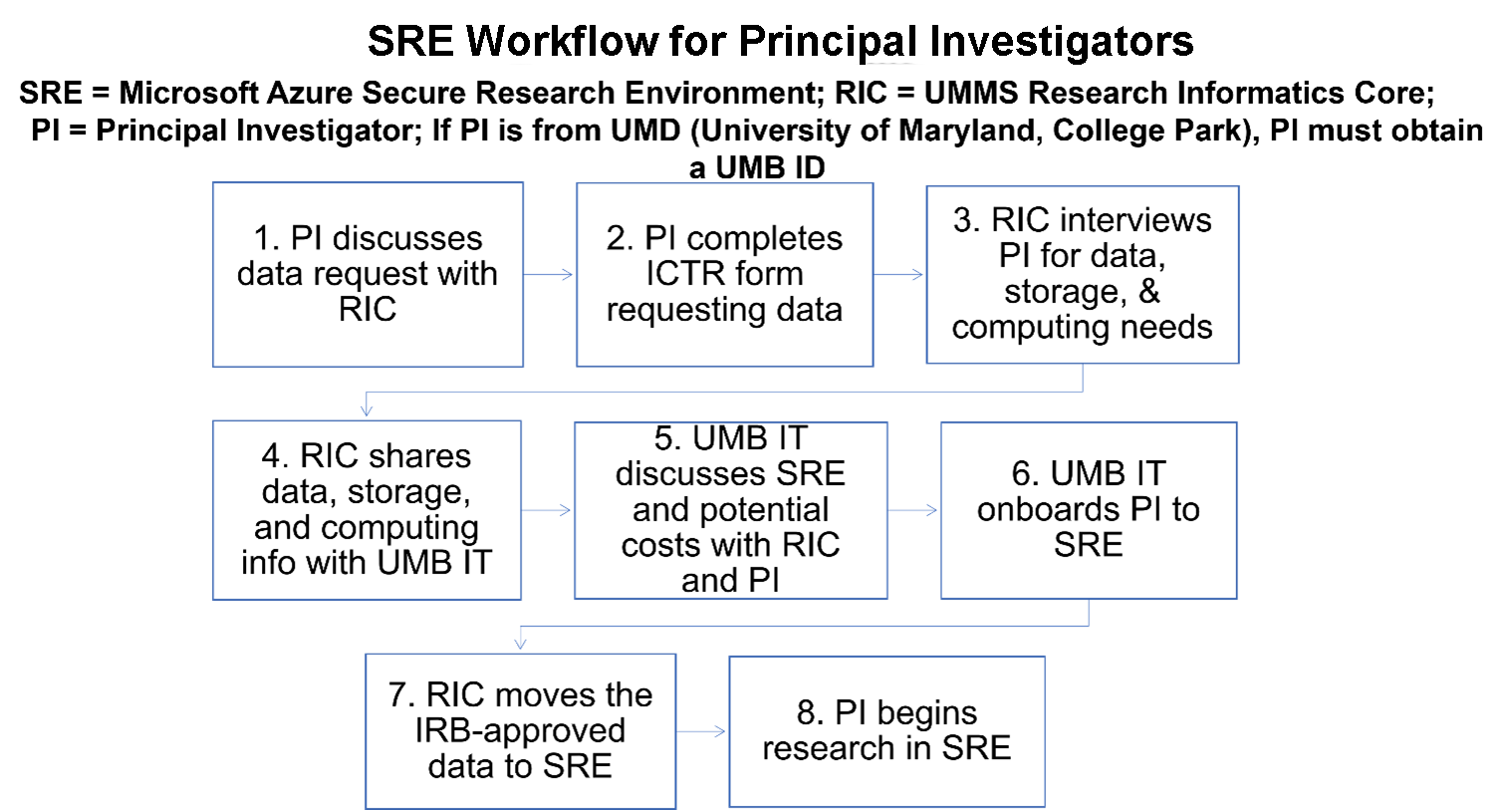
SRE Workflow for Principal Investigators
SRE = Microsoft Azure Secure Research Environment; RIC = UMMS Research Informatics Core;
PI = Principal Investigator; If PI is from UMD (University of Maryland, College Park), PI must obtain a UMB ID
- PI discusses data request with RIC
- PI completes ICTR form requesting data
- RIC interviews PI for data, storage, & computing needs
- RIC shares data, storage, and computing info with UMB IT
- UMB IT discusses SRE and potential costs with RIC and PI
- UMB IT onboards PI to SRE
- RIC moves the IRB-approved data to SRE
- PI begins research in SRE
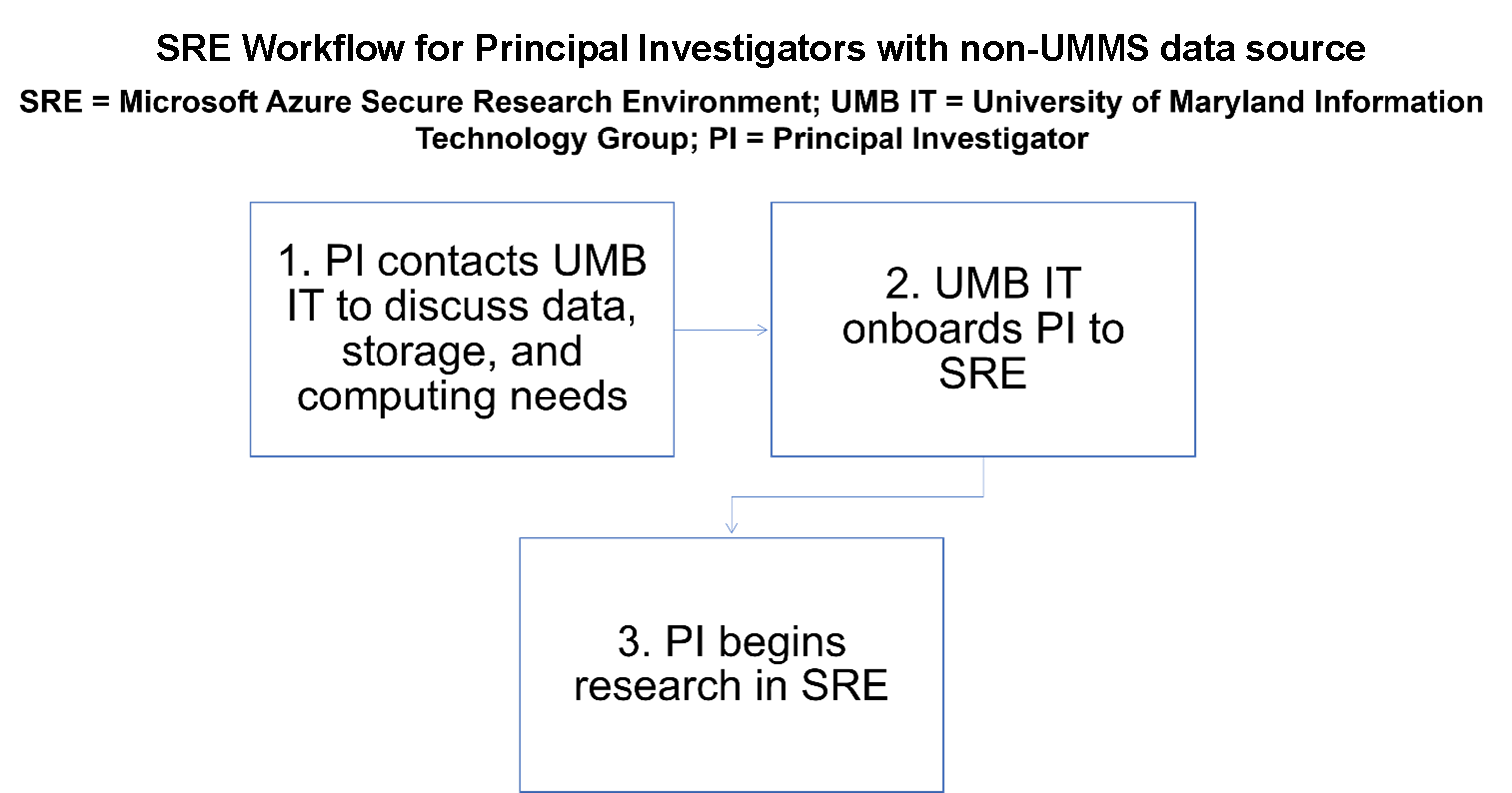
SRE Workflow for Principal Investigators with non-UMMS Data source
SRE = Microsoft Azure Secure Research Environment;
UMB IT = University of Maryland Information Technology Group;
PI = Principal Investigator
- PI contacts UMB IT to discuss data, storage, and computing needs
- UMB IT onboards PI to SRE
- PI begins research in SRE
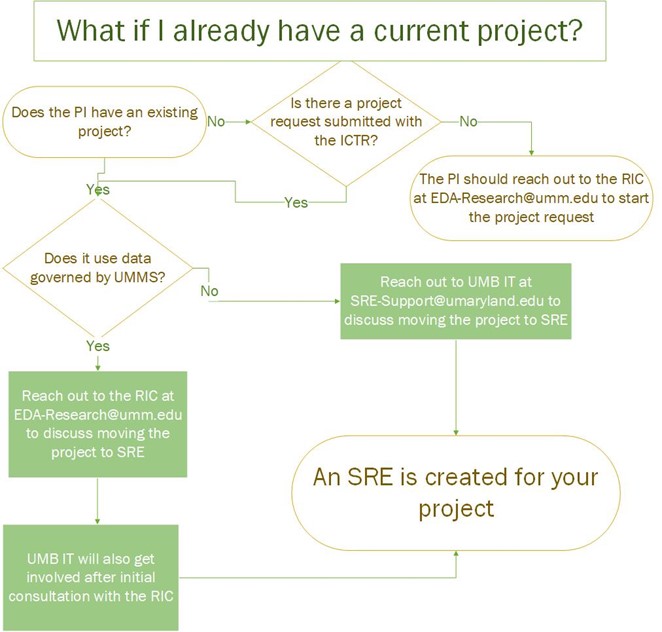
What if I already have a current project?
Does the PI have an existing project?
- No: Is there a project request submitted with ICTR?
- No: The PI should reach out to the RIC at EDA-Research@umm.edu to start the project request
- Yes: Does it use data governed by UMMS?
- Yes: Reach out to the RIC at EDA-Research@umm.edu to discuss moving the project to SRE.
- UMB IT will also get involved after initial consultation with the RIC.
- An SRE is created for your project
- UMB IT will also get involved after initial consultation with the RIC.
- No: Reach out to UMB IT at SRE-Support@umaryland.edu to discuss moving the project to SRE
- An SRE is created for your project
- Yes: Reach out to the RIC at EDA-Research@umm.edu to discuss moving the project to SRE.
- Yes: Does it use data governed by UMMS?
- Yes: Reach out to the RIC at EDA-Research@umm.edu to discuss moving the project to SRE.
- UMB IT will also get involved after initial consultation with the RIC.
- An SRE is created for your project
- UMB IT will also get involved after initial consultation with the RIC.
- No: Reach out to UMB IT at SRE-Support@umaryland.edu to discuss moving the project to SRE
- An SRE is created for your project
- Yes: Reach out to the RIC at EDA-Research@umm.edu to discuss moving the project to SRE.
Research needs are discussed with an IT engineer who will advise the PI as to the appropriate computer configuration and data storage needs required to support the project.
There is no set limit on the data storage capacity, but to be judicious and cost-effective, a PI with the help of an IT engineer will determine an appropriate amount of storage that would support the project.
The data should reside in the SRE during the course of the research project. After project completion, a cost-effective and secure approach to the data should be used, e.g., the data should be securely archived or deleted.