


Activate PCard & Register Account
PCARD ACTIVATION STEPS
By Website:
1. Navigate to US Bank Access Online https://www.access.usbank.com/
2. Scroll to the bottom of the screen.
3. Click Activate Your Card
4. Complete the fields to activate your card.
2. Scroll to the bottom of the screen.
3. Click Activate Your Card
4. Complete the fields to activate your card.
By Phone:
1. Call 1-800-344-5696
2. Respond to each of the following prompts.
2. Respond to each of the following prompts.
a. Enter your 16-digit account number [printed on your PCard]
b. Enter the 5-digit ZIP code of your mailing address [must match PCard Program records*]
c. To activate your account, press 1.
d. Last 4 Social Security Number: [Last 4 of your UMB Employee ID]
UMB does not give employee’s SSN to the bank
e. Enter your business telephone number [must match PCard Program records*]
b. Enter the 5-digit ZIP code of your mailing address [must match PCard Program records*]
c. To activate your account, press 1.
d. Last 4 Social Security Number: [Last 4 of your UMB Employee ID]
UMB does not give employee’s SSN to the bank
e. Enter your business telephone number [must match PCard Program records*]
* If unsure contact PCard-Admin@umaryland.edu
PCARD REGISTRATION
Online registration is required to access your PCard account. To do this navigate to US Bank Access Online https://www.access.usbank.com/
Step One:
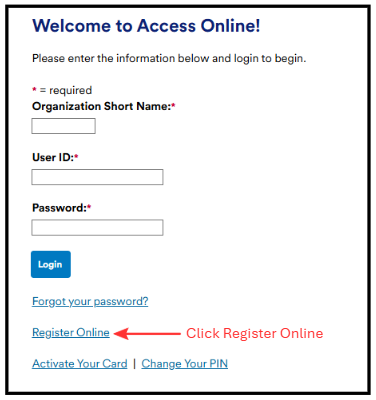
Step Two:
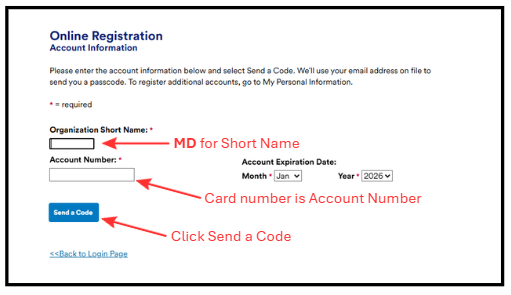
At this point a code will be emailed to the account listed on your application. Retrieve the code and continue following the registration prompts. After you complete this process, you are ready to begin using Access Online.
Statements are available of the 25th or 26th of each month.